EARNINGS SEASON, HANDLED
Company earnings alerts that show the number, not the spin
Follow a company in GetSignal and minutes after it reports, you get one push: reported EPS next to the street estimate, labeled beat, miss, or in line. No headlines to parse, no refresh button to hammer.


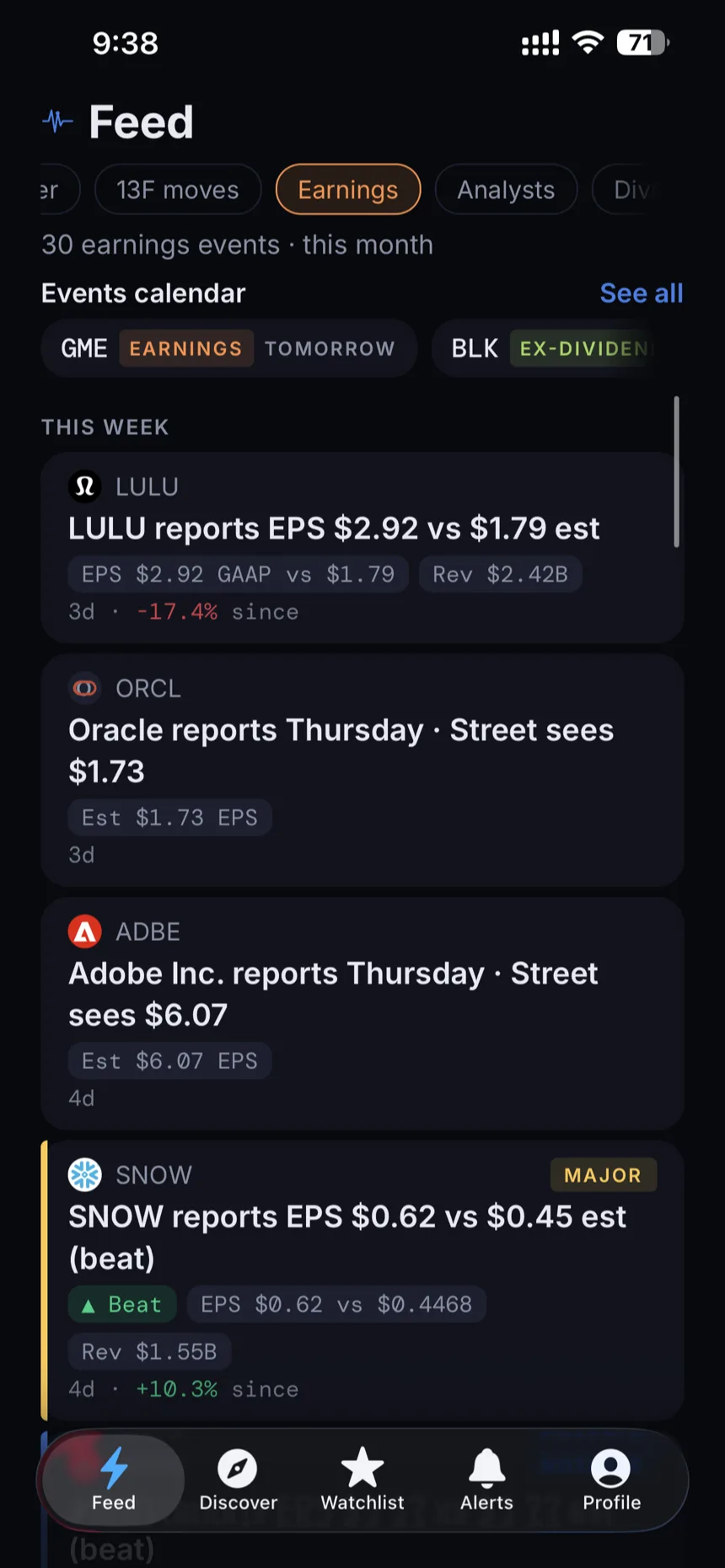
What an earnings event looks like in GetSignal
GetSignal treats an earnings report as an event with a before and an after. Before the report, the company profile and the events calendar show the scheduled date alongside the consensus EPS estimate, so you know what the market expects and when the answer arrives. When the numbers land, GetSignal turns the release into a single feed event: reported EPS next to the estimate, labeled beat, miss, or in line. Just the number, the expectation, and the gap between them.
If you follow the company, that event becomes a push on your lock screen. One push per result: companies with multiple share classes are deduplicated, so a dual listed stock never buzzes you twice for the same report. And because earnings ride the same feed as everything else GetSignal tracks, the result shows up in context, next to any insider trades filed around it and any analyst reaction that follows.
The events calendar: your week, before it happens
Most earnings surprises are only surprises because nobody checked the calendar. GetSignal's events calendar lays out the month ahead: every scheduled report for the next 30 days, with the consensus estimate attached, so Monday morning you already know which of your companies report and what the street is looking for. That turns earnings season from a stream of ambushes into a schedule you can actually plan around.
The calendar works alongside the feed's category filters. Flip the feed to earnings only and you get a clean ledger of what already happened: who beat, who missed, who landed in line, with each event carrying an importance flag so a routine in line quarter never reads like a blowup. Earnings is one lane of a wider road here. The same feed carries Congress trades filed under the STOCK Act and quarterly 13F fund moves, so the report you just read sits beside what insiders and institutions were doing in the same name.
Analyst rating changes ride the same feed
Earnings rarely land in silence. In the days after a report, analysts revisit their calls, and those rating changes flow through the same feed as the result itself: the firm, the new rating, and the company it applies to, each with its own importance flag. You do not need a separate app or a news scroll to find out that a downgrade followed the miss; it arrives in the same stream, under the same rules you set.
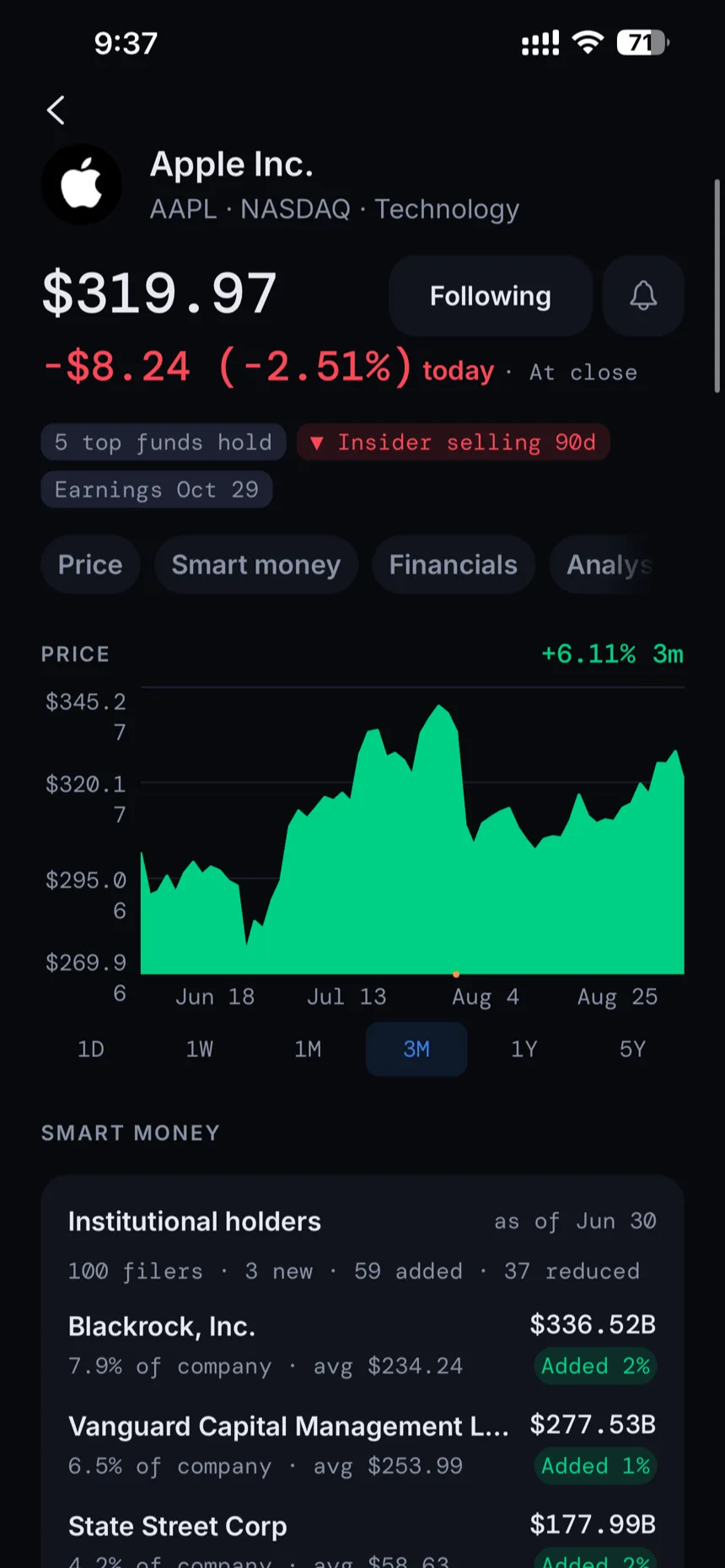
Every company profile also keeps the fuller picture: the price chart, financials, the current spread of analyst ratings, insider activity, and the top 13F holders in the name. A rating change is one firm's published opinion, and GetSignal reports it as exactly that. It is not a recommendation from GetSignal, and the app never dresses it up as one. The methodology screen explains where each figure comes from, and names the source behind it.
Build an earnings-only alert rule
Alerts in GetSignal are rules you write, not a firehose you endure. Each rule picks its own event types, so you can build one that fires for earnings and nothing else. Then set an importance floor: every event is flagged Routine, Update, Notable, or Major, and your rule can ignore everything below the bar you choose. Quiet hours keep pushes off your lock screen overnight, and a daily push cap puts a hard ceiling on even the busiest reporting day.
If one rule is not enough, Signal Pro raises the ceiling to 20 of them, so earnings can have their own settings on every name you follow while everything else stays quieter. Pro also unlocks unlimited follows, full feed history, and price alerts on any ticker. The free plan covers 10 follows and 30 days of history, which is plenty to see whether the setup fits how you follow the market. Details are in the pricing section.
Everything around the report, one tap away
The alert is the front door. Behind it, GetSignal keeps the context you need to make sense of a quarter.
- Upcoming report dates with the street estimate, then reported EPS labeled beat, miss, or in line
- Company profiles with price chart, financials, analyst ratings, insider activity, and top 13F holders
- Feed category filters that cut the stream to earnings only
- Per rule event types, importance floor, quiet hours, and daily push caps
- Third party news stays out unless you opt in
Frequently asked questions
How fast are earnings alerts in GetSignal?
GetSignal polls for results every 5 minutes, around the clock, so the alert lands minutes after the report, with the reported EPS next to the street estimate and a beat, miss, or in line label. You get exactly one push per result: companies with multiple share classes are deduplicated so a single report never fires twice.
Does GetSignal show the estimate before the report?
Yes. Upcoming earnings events show the scheduled date alongside the consensus EPS estimate, on the company profile and in the events calendar. Once the report is out, the same event shows the reported number against that estimate.
Can I get alerts for earnings only?
Yes. Alert rules in GetSignal are built per rule: pick just the earnings event type, set an importance floor from Routine up to Major, and add quiet hours and a daily push cap. Everything else stays out of your notifications.
Is GetSignal free?
Yes. The free plan includes 10 follows, per-event push alerts, and 30 days of history. Signal Pro adds unlimited follows, full history, up to 20 alert rules, and price alerts, at $14.99 a month or $119.99 a year with a 7 day free trial.
Is this investment advice?
No. GetSignal reports what companies disclose and what analysts publish. It does not tell you what a beat or a miss means for the stock, and it never makes recommendations. What you do with the information is up to you.
Never learn about a report from tomorrow's headlines
Free to start. The Pro trial runs through the App Store or Google Play and becomes a paid subscription unless you cancel. Not investment advice.